
Introduction
Many businesses start with energy, passion, and a great idea. As they grow, however, the owner often becomes the center of every decision. From approving invoices and managing employees to handling customer issues and closing sales, everything depends on one person. While this approach may work in the early stages, it quickly becomes the biggest obstacle to scaling the business.
When important knowledge exists only in the owner's mind, the business becomes difficult to manage. Employees constantly ask the same questions, work is completed differently by different people, mistakes become more common, and progress slows whenever the owner is unavailable. Without documented systems, growth creates confusion instead of efficiency.
Business systems solve this problem by turning knowledge into repeatable workflows that anyone on your team can follow. Well-designed systems improve consistency, reduce human error, simplify employee training, and make it easier to delegate responsibilities. Instead of relying on memory, your business runs on documented processes that produce predictable results.
In this guide, you'll learn how to build scalable business systems from the ground up. We'll cover how to identify your core processes, map workflows, create standard operating procedures (SOPs), automate repetitive tasks, assign ownership, measure performance, and continuously improve your systems so your business can grow without depending on you for every decision.
What Are Business Systems?
A business system is a repeatable way of completing a task or achieving a specific outcome. Instead of relying on memory, individual experience, or constant supervision from the business owner, a system defines exactly how work should be performed so anyone can achieve consistent results. Whether it's onboarding a new customer, processing an invoice, or publishing a marketing campaign, every important activity in your business should have a documented system behind it.
Many business owners confuse systems with goals, but they serve completely different purposes. A goal describes the result you want to achieve, while a system is the repeatable method that helps you reach that result consistently. For example, increasing monthly sales is a goal, but your lead generation, sales follow-up, and customer onboarding workflows are the systems that make that growth possible.
It's also important to understand the difference between a system and a process. A process is a series of individual steps used to complete one task, while a business system brings together people, processes, tools, responsibilities, and performance measurements into a complete framework. In simple terms, a process is one part of a system.
Think about a restaurant. Preparing a single meal is a process. Running the entire restaurant—from taking reservations and managing inventory to serving customers and collecting payments—is the business system. One focuses on a task, while the other ensures the entire operation runs smoothly every day.
| Term | Example |
|---|---|
| Goal | Increase monthly sales by 30%. |
| System | A complete lead generation and sales workflow that consistently produces new customers. |
| Process | The daily steps a sales representative follows to qualify and contact new leads. |
Why Every Growing Business Needs Systems
Growth is exciting, but it also creates complexity. More customers mean more emails, more orders, more employees, and more decisions. Without documented business systems, every new customer adds pressure instead of profit. Systems allow your business to handle higher workloads while maintaining the same level of quality and consistency.
Whether you're a freelancer, startup, agency, or established company, well-designed systems make your business easier to manage and much easier to scale.
Spend Less Time on Repetitive Work
Instead of explaining the same tasks repeatedly or solving identical problems every day, documented systems provide clear instructions that employees can follow independently. This reduces interruptions and frees up valuable time for higher-priority work.
Onboard Employees Faster
New employees become productive much faster when every workflow is documented. Rather than relying on verbal training, they can follow step-by-step procedures, reducing mistakes and shortening the learning curve.
Deliver a Consistent Customer Experience
Customers expect the same level of service every time they interact with your business. Systems ensure that every order, support request, and customer interaction follows the same quality standards regardless of who performs the work.
Delegate With Confidence
Delegation becomes much easier when employees have documented processes to follow. Instead of constantly checking progress or answering questions, managers can focus on improving the business while teams work more independently.
Increase Productivity
Clear workflows eliminate unnecessary steps, reduce confusion, and help teams complete tasks more efficiently. Even small improvements repeated hundreds of times each month can significantly increase overall productivity.
Improve Profitability
Fewer mistakes, faster workflows, and better resource management reduce operating costs. As efficiency improves, your business can serve more customers without increasing expenses at the same rate, leading to healthier profit margins.
Build a Business That Doesn't Depend on You
Perhaps the greatest benefit of business systems is freedom. Instead of being involved in every decision, you can trust your team to follow documented procedures. This allows your business to continue operating even when you're away, making growth more sustainable over the long term.
Signs Your Business Needs Better Systems
Many business owners don't realize they have a systems problem until growth begins to slow. They often assume the solution is hiring more employees or working longer hours, when the real issue is that important processes aren't documented or standardized. If any of the situations below sound familiar, your business will likely benefit from stronger systems.
Employees Ask the Same Questions Every Day
If your team constantly asks how to complete routine tasks, it usually means there are no clear instructions or documented procedures. The same questions shouldn't require the same answers every week.
Every Decision Needs Your Approval
When every invoice, customer request, or project decision waits for the owner, the business becomes a bottleneck. Well-designed systems allow employees to make routine decisions confidently within clear guidelines.
Tasks Take Longer Than They Should
Repeating the same work in different ways wastes time. Standardized workflows help teams complete tasks faster because everyone follows the same proven process.
Deadlines Are Frequently Missed
Missed deadlines often indicate unclear responsibilities or inconsistent workflows. Good systems define who is responsible for each task, what needs to be done, and when it should be completed.
Customers Receive Inconsistent Service
If one customer has an excellent experience while another receives poor service, your business is relying too much on individual employees instead of standardized processes.
Important Knowledge Exists Only in People's Heads
When only one employee knows how to perform a critical task, your business becomes vulnerable. If that person leaves or is unavailable, productivity suffers. Documenting knowledge protects your business and makes training much easier.
The Same Mistakes Keep Happening
Repeated errors usually point to unclear instructions rather than poor employees. Strong systems reduce mistakes by giving everyone a consistent way to complete important tasks.
Growth Feels Chaotic Instead of Exciting
Growing businesses should become more efficient, not more stressful. If every new customer creates confusion, missed tasks, or extra pressure on your team, it's a sign your systems need to evolve before your business can scale successfully.
Identify Your Core Business Processes
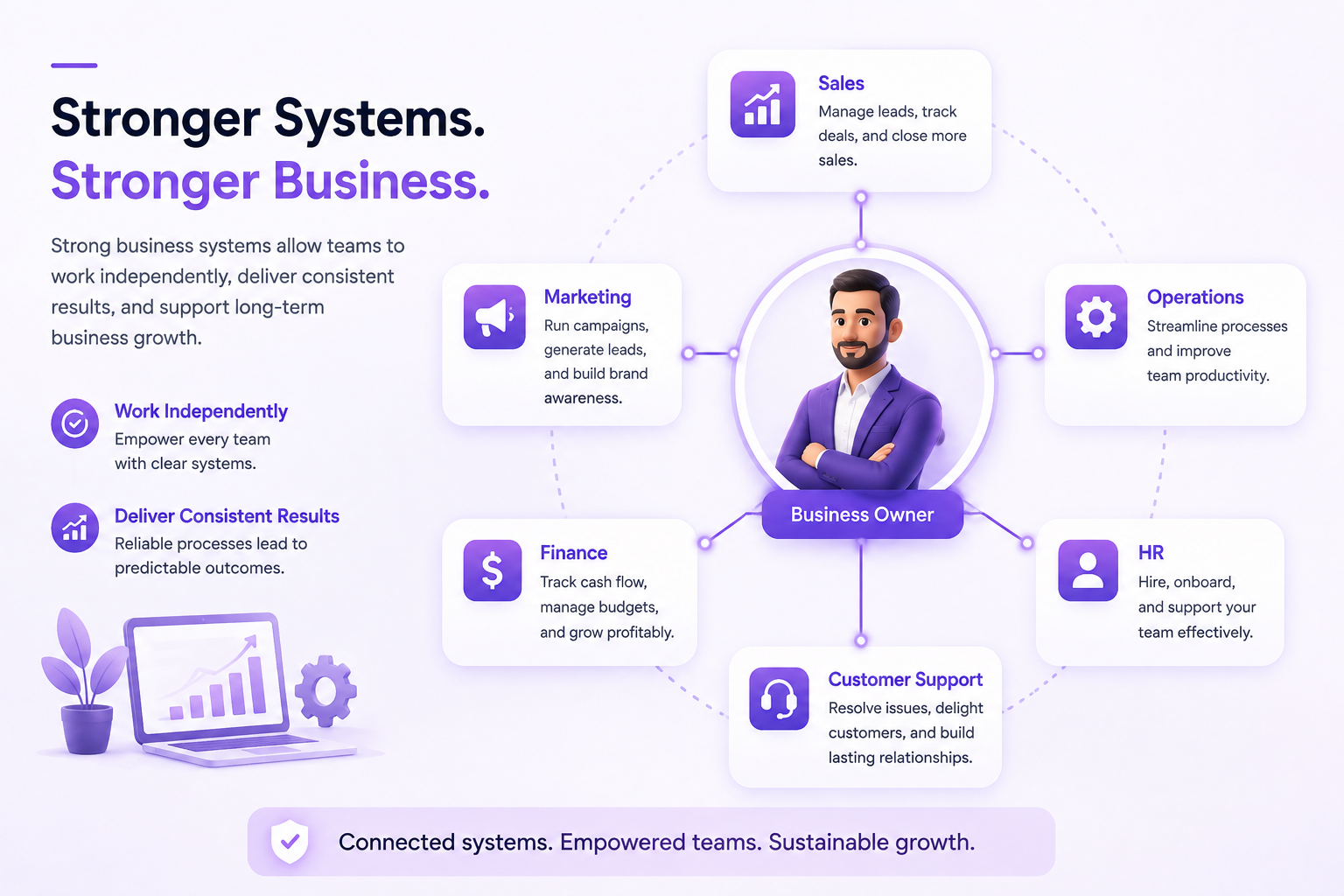
Before you can build effective business systems, you need to know exactly what your business does every day. Every company is made up of repeatable processes that keep operations running. Start by identifying these core activities and grouping them by department. This gives you a clear picture of where documentation, automation, and improvements will have the greatest impact.
Don't try to document everything at once. Begin with the processes that directly affect customers, generate revenue, or consume the most time. Once those systems are in place, expand to the rest of your business.
Sales
Document how leads are generated, qualified, followed up, quoted, negotiated, and converted into paying customers. A clear sales system ensures every opportunity is handled consistently.
Marketing
Standardize content creation, social media publishing, SEO, email marketing, paid advertising, and campaign reporting so marketing activities remain consistent as your business grows.
Operations
Map every operational task, including project management, customer onboarding, order fulfillment, quality checks, and service delivery. Efficient operations reduce delays and improve customer satisfaction.
Finance
Create systems for invoicing, payment collection, payroll, expense tracking, budgeting, and financial reporting. Financial processes should be accurate, repeatable, and easy to audit.
Customer Support
Document how support requests are received, assigned, resolved, and followed up. Consistent support systems improve response times and create a better customer experience.
Human Resources
Build repeatable processes for hiring, onboarding, employee training, performance reviews, and offboarding. Strong HR systems help teams grow without creating unnecessary confusion.
Once you've identified your core business processes, the next step is to map each workflow in detail. This helps you understand how work moves through your business, where delays occur, and which steps can be simplified or automated.
Map Every Workflow Step by Step
Once you've identified your core business processes, the next step is to map exactly how each one works. This exercise often reveals hidden bottlenecks, unnecessary approvals, duplicate work, and tasks that could easily be automated. Don't rely on memory—write down every step exactly as it happens today, even if the process isn't perfect.
Start with one workflow that directly impacts revenue or customer experience. Follow it from beginning to end and ask yourself a simple question at every stage: "What happens next?" Continue until the work is completely finished. This creates a clear visual map that everyone on your team can understand and improve.
Example: New Customer Sales Workflow
Questions to Ask for Every Workflow
As you map each process, challenge every step. Many businesses discover they have unnecessary approvals, duplicate work, or outdated procedures that slow everything down.
- What triggers this workflow?
- Who is responsible for each step?
- What information is needed before work begins?
- Where do delays usually happen?
- Which steps are repeated every day?
- Can any part of this workflow be automated?
- How do you know the process is complete?
Don't Build the Perfect Workflow First
Your first workflow doesn't need to be perfect—it simply needs to reflect reality. Document how work happens today, identify what's slowing your team down, and improve one step at a time. Small improvements across dozens of workflows often have a much bigger impact than redesigning a single process from scratch.
Create Standard Operating Procedures (SOPs)
Once you've mapped a workflow, turn it into a Standard Operating Procedure (SOP). An SOP is simply a document that explains exactly how a task should be completed. The goal isn't to create lengthy manuals—it's to make sure anyone on your team can perform the task correctly without asking for help.
A well-written SOP saves time, reduces mistakes, speeds up employee training, and ensures customers receive the same quality of service every time. If someone leaves your company tomorrow, another employee should be able to continue the work simply by following the SOP.
Every SOP Should Answer These Questions
| Section | What to Include |
|---|---|
| Purpose | Why this procedure exists and the expected outcome. |
| Owner | Who is responsible for completing the task. |
| Tools Required | Software, documents, or equipment needed. |
| Step-by-Step Process | Clear instructions written in the exact order they should be completed. |
| Common Mistakes | Errors to avoid and how to prevent them. |
| Success Checklist | How to confirm the task has been completed correctly. |
| Last Updated | Review date to keep the SOP accurate. |
Example: Customer Refund SOP
Imagine a customer requests a refund. Without an SOP, every employee might handle the situation differently. With a documented procedure, every customer receives the same professional experience.
- Verify the original order.
- Check whether the purchase meets the refund policy.
- Approve or reject the request.
- Process the refund.
- Notify the customer by email.
- Update the CRM and accounting records.
Keep SOPs Simple
The best SOPs are easy to read, easy to update, and easy to follow. Avoid unnecessary technical language or long paragraphs. Use clear instructions, screenshots where helpful, and review every SOP regularly to ensure it still reflects how your business operates today.
Choose the Right Business Tools
Business systems become much more effective when supported by the right tools. However, many companies make the mistake of buying software before defining their processes. A tool should improve an existing workflow—not replace good planning. Start by documenting how work should be done, then choose software that makes the process faster, more accurate, and easier to manage.
Before purchasing any software, ask yourself one question: "Will this tool save time, reduce mistakes, or improve collaboration?" If the answer is no, it's probably unnecessary.
Match the Tool to the Job
Every department has different requirements. Your sales team may need a CRM, while your finance team benefits from accounting software. Avoid forcing one application to solve every problem. Instead, select tools that excel at their specific purpose and integrate well with the rest of your workflow.
Prioritize Ease of Use
The most powerful software isn't always the best choice. If your team struggles to learn it, adoption will be low and productivity will suffer. Choose tools with intuitive interfaces, clear documentation, and features your business will actually use.
Make Sure Tools Work Together
Businesses often waste hours manually copying information between different applications. Whenever possible, choose tools that integrate with each other so customer data, invoices, tasks, and reports move automatically between systems.
Don't Pay for Features You'll Never Use
Expensive software doesn't automatically create better systems. Focus on features that solve today's business problems rather than paying for advanced capabilities your team may never need.
Think Long-Term
Your business will grow, so your software should grow with it. Consider scalability, security, customer support, data backups, and future integrations before making a decision. Migrating to a new system later can be expensive and time-consuming.
| Business Need | Type of Tool |
|---|---|
| Customer Management | CRM |
| Project Tracking | Project Management |
| Accounting | Accounting Software |
| Process Documentation | Knowledge Base or Wiki |
| Automation | Workflow Automation Platform |
| Team Communication | Messaging & Collaboration Platform |
| Business Reporting | Analytics Dashboard |
Automate Repetitive Tasks
Automating routine tasks frees your team from manual work and ensures consistency across your business. Using tools like Zapier or Make (Integromat), or built-in automations in HubSpot or Salesforce, you can connect apps like Gmail, Slack, QuickBooks, and more so information flows automatically. Each automation (trigger → actions) is like hiring a tireless assistant: small time savings today can add up to hours every week.
-
Lead Capture & Follow-Up: When a prospect submits a web form (Typeform, Google Forms, or HubSpot Forms), automatically create a new contact in your CRM and notify the sales team. For example, use Zapier or a HubSpot workflow: form submission → create contact in HubSpot/Salesforce → send welcome email (Gmail) → post alert in your #sales Slack channel. Tools: Zapier/Make, HubSpot, Salesforce, Gmail, Slack.
flowchart LR
    Form[Prospect fills out lead form] --> CRM[Create contact in HubSpot]
    CRM --> Email[Send welcome email (Gmail)]
    CRM --> Slack[#sales channel notification]
Workflow: Automate new lead intake and follow-ups. -
Invoice Payment Processing: When a customer pays an invoice (via Stripe or QuickBooks), automatically record the payment and send a receipt. For instance, use Zapier: trigger on Stripe payment → update invoice status in QuickBooks → email receipt via Gmail. Tools: Stripe, QuickBooks, Zapier, Gmail.
Trigger: Payment received in Stripe Action: Update invoice status in QuickBooks Action: Send receipt email via Gmail -
New Employee Onboarding: Automate account setup for new hires. When HR adds a person to BambooHR, a Google Sheet, or your HRIS, trigger a workflow: create their Google Workspace account, invite them to Slack, and send a welcome email with first-day instructions. Tools: BambooHR/Google Sheets, Zapier/Make, Google Workspace, Slack, Gmail.
flowchart LR
    HRIS[New hire added to HR system] --> GAccount[Create Google Workspace account]
    HRIS --> Slack[Invite to Slack workspace]
    HRIS --> Email[Send welcome email (Gmail)]
Workflow: Automate new hire account setup. -
Support Ticket Routing: Route incoming support requests automatically. For example, an email to support@example.com can trigger Zapier to create a ticket in Zendesk (or Help Scout) and then notify your #support Slack channel. Tools: Gmail (or Help Scout), Zendesk, Slack, Zapier.
Email received at support -> Create ticket in Zendesk -> Notify #support channel in Slack -
Social Media Publishing: Share new content automatically. When you post a new blog or product on WordPress (or Shopify), trigger an automated campaign. For example, new WordPress post → Zapier → Buffer/Hootsuite → publish on Twitter and LinkedIn. Tools: WordPress/Shopify, Zapier, Buffer/Hootsuite, Slack.
New blog post published -> Buffer shares on Twitter & LinkedIn -> Alert #marketing channel in Slack -
Deal Follow-Up & Task Creation: Automate your sales pipeline workflows. For example, when a deal in Salesforce or HubSpot moves to "Proposal Sent", automatically send a personalized follow-up email and create a task in Asana. Tools: Salesforce/HubSpot, Zapier, Gmail, Asana.
Trigger: Deal stage = Proposal Sent Action: Send follow-up email (Gmail) Action: Create follow-up task in Asana -
Inventory Reorder Alerts: Prevent stockouts by automating alerts. If a product’s stock level in Shopify (or another inventory tool) falls below a threshold, trigger an email or Slack notification to purchasing or create a reorder task. Tools: Shopify, Zapier, Slack/Email.
Stock level below threshold -> Send alert email or Slack message -> Create purchase order task -
Mailing List Sync: Keep sales and marketing data in sync. For example, when a new contact is created in your CRM, automatically add them to your Mailchimp email list or HubSpot marketing list. Tools: HubSpot CRM, Salesforce, Zapier, Mailchimp.
New CRM contact created -> Add contact to Mailchimp (or HubSpot) list -
Appointment Scheduling & Reminders: Coordinate meetings seamlessly. For instance, when someone books a meeting via Calendly, automatically create a Zoom link, add a Google Calendar event, and send a reminder email. Tools: Calendly, Zoom, Google Calendar, Zapier.
New Calendly booking -> Create Google Calendar event -> Send Zoom link and reminder email -
Data Backup & Sync: Secure your data with automated backups. For example, anytime a file is added to Google Drive (or a new form entry is submitted), use Zapier to copy it to Dropbox or log key data into a Google Sheet/Notion. Tools: Google Drive, Dropbox, Notion, Zapier.
New file in Google Drive -> Copy to Dropbox & log details in Google Sheets
Prioritize Your Automations
Not all automations are equally impactful. Use an Impact vs. Effort matrix to decide which tasks to automate first. Focus on high-impact, low-effort workflows (quick wins) before tackling larger projects. Save the high-effort automations for when you have more time or resources.
| Low Effort | High Effort | |
|---|---|---|
| High Impact | Quick Wins: Automate these first. | Major Projects: Plan carefully and break them into steps. |
| Low Impact | Minor Tasks: Automate if easy, but low priority. | Avoid/Defer: Not worth the effort now. |
Test and Monitor Automations
Every automation should be tested end-to-end before relying on it. Run it with sample data, watch for errors, and verify that each step completes correctly. Once live, monitor the first few runs and periodically check logs or dashboards to catch any issues. Continuous monitoring and occasional adjustments ensure your automations keep working as your business changes.
- ✓ Run each new automation in test mode to confirm all steps work as expected.
- ✓ Check for errors or failed runs in your automation tool (Zapier/Make logs, email notifications, etc.).
- ✓ Validate the results: e.g., confirm emails were sent, contacts created, and data synced correctly.
- ✓ Get feedback from team members who use the automation and watch for missed tasks.
- ✓ Review and update automations quarterly or whenever your workflows change.
Assign Ownership to Every Business System
Even the best business system will eventually fail if nobody is responsible for maintaining it. Every important process should have a clearly assigned owner who ensures the workflow is followed, documentation stays up to date, and improvements are made whenever problems arise. Ownership creates accountability and prevents important systems from being forgotten.
Remember that assigning ownership doesn't mean one person performs every task. It simply means one person is accountable for making sure the system continues to produce consistent results.
What Every System Owner Should Be Responsible For
A system owner should regularly review performance, update documentation, train new employees, identify bottlenecks, and recommend improvements. As your business grows, systems must evolve too.
| Business System | System Owner | Success Metric |
|---|---|---|
| Sales | Sales Manager | Lead-to-customer conversion rate |
| Marketing | Marketing Lead | Qualified leads generated |
| Customer Support | Support Manager | Average response time |
| Operations | Operations Manager | Projects completed on time |
| Finance | Finance Manager | Invoice accuracy & payment collection |
Always Assign a Backup Owner
What happens if your system owner is on vacation or leaves the company? Every critical business system should also have a backup owner who understands the workflow and can take over immediately when needed. This reduces business risk and ensures operations continue without interruption.
Review Ownership Regularly
Business systems aren't static. As your company grows, responsibilities may change, new tools may be introduced, and workflows may evolve. Review system ownership at least once every quarter to ensure responsibilities remain clear and every critical process has someone accountable for its success.
Measure System Performance
Building business systems is only half the job. To know whether they're actually helping your business, you need to measure their performance regularly. A system that looked efficient six months ago may now be slowing your team down because your business, customers, and processes have changed.
Instead of relying on assumptions, use measurable data to identify what's working, what needs improvement, and where automation or process changes will have the biggest impact.
Time to Complete Work
Track how long important tasks take from start to finish. If customer onboarding previously required three days but now takes one day, your system is becoming more efficient. If completion times continue increasing, investigate where delays are occurring.
Error Rate
Count how often mistakes happen, whether they're incorrect invoices, missed deadlines, customer complaints, or order fulfilment errors. Strong systems should reduce errors over time, not increase them.
Customer Satisfaction
Customer feedback is one of the clearest indicators of system quality. Faster responses, consistent service, and fewer mistakes usually lead to happier customers, better reviews, and higher retention rates.
Employee Productivity
Productivity isn't about working longer hours—it's about completing more valuable work in less time. If employees spend less time on repetitive tasks and more time serving customers or improving the business, your systems are delivering value.
Profitability
Better systems should improve your bottom line. Compare revenue, operating costs, and profit margins before and after introducing new processes or automation. If costs decrease while quality remains high, your systems are working.
Automation Coverage
Review how much of your daily work is still performed manually. The goal isn't to automate everything, but to eliminate repetitive tasks that don't require human judgment. As your business grows, automation coverage should increase without sacrificing quality.
A Simple Monthly Review
Set aside one hour each month to review your most important business systems. Compare this month's performance with the previous month and ask the following questions:
- Are we completing work faster than before?
- Have customer complaints increased or decreased?
- Which task still wastes the most time?
- Which process causes the most mistakes?
- What can we automate next?
- Do our SOPs still reflect how we actually work?
Continuous measurement is what separates businesses that simply document processes from businesses that continuously improve them. Even small improvements made every month compound into significant gains in productivity, customer satisfaction, and profitability over time.
Continuously Improve Your Business Systems
One of the biggest misconceptions about business systems is that they're created once and never changed. In reality, the best businesses treat every system as a living document. Customer expectations evolve, new technology becomes available, employees discover better ways of working, and your business itself changes over time. A system that worked perfectly last year may now be slowing your team down.
Continuous improvement doesn't require rebuilding everything. Instead, focus on making small, measurable improvements on a regular basis. Over months and years, these incremental changes create faster workflows, happier customers, and a more efficient business.
Review Your Systems Regularly
Schedule a monthly or quarterly review for every important business system. Look at performance data, customer feedback, employee suggestions, and operational challenges to identify areas that need improvement before they become bigger problems.
Listen to the People Doing the Work
Employees working with a process every day often notice inefficiencies long before managers do. Encourage them to suggest improvements, remove unnecessary steps, and share ideas that make their work easier. The people closest to the process usually have the best insights.
Remove Unnecessary Steps
As businesses grow, workflows often become longer than necessary. Extra approvals, duplicate data entry, outdated forms, or unnecessary meetings can quietly reduce productivity. Challenge every step by asking, "Does this still add value?" If the answer is no, remove or simplify it.
Keep Documentation Up to Date
Outdated SOPs are almost as harmful as having no documentation at all. Whenever a workflow changes, update the related documents immediately so employees always have accurate instructions to follow.
Improve Before You Automate More
Automation should never hide inefficient processes. Before introducing new software or AI, make sure the existing workflow is simple, well-documented, and producing consistent results. Automating a broken process usually creates bigger problems, not better performance.
Track Improvements Over Time
Keep a simple improvement log that records what changed, why it changed, and the results. This helps you measure progress and prevents your team from repeating unsuccessful ideas.
| Improvement | Expected Result | Success Metric |
|---|---|---|
| Remove duplicate approvals | Faster project completion | Average completion time |
| Update onboarding SOP | Quicker employee training | Days to full productivity |
| Automate invoice creation | Reduce manual work | Hours saved each month |
| Improve support workflow | Better customer experience | Customer satisfaction score |
Small Improvements Create Big Results
You don't need to redesign your entire business to see meaningful improvements. Saving just five minutes on a task that's completed 100 times a week adds up to hundreds of hours each year. Businesses that improve their systems consistently become more productive, more profitable, and much easier to scale than businesses that wait for major overhauls.
Real-World Business Systems Examples
Understanding business systems is one thing—seeing them in action is another. Below are practical examples showing how different businesses can transform everyday operations into repeatable, scalable systems. Notice that each example follows the same principle: define the workflow, document it, assign ownership, and improve it over time.
Your systems don't need to be complicated. Even simple, well-documented workflows can save hours every week, reduce mistakes, and create a much better experience for both employees and customers.
Example 1: Sales System
Instead of relying on memory to manage leads, every enquiry follows the same sales process from first contact to final payment.
Example 2: Content Marketing System
Publishing high-quality content consistently becomes much easier when every stage follows a documented workflow instead of being recreated each time.
Example 3: Customer Support System
A structured support process ensures every customer receives timely, consistent assistance regardless of which team member handles the request.
The Pattern Behind Every Successful System
Although these examples come from different industries, they all follow the same structure. Every system starts with a clear trigger, follows a documented workflow, assigns responsibility, produces a measurable outcome, and is reviewed regularly for improvement. Once you understand this pattern, you can apply it to virtually any part of your business—from hiring employees and processing invoices to managing projects and delivering customer support.
Free Business System Templates & Resources
Building business systems from scratch can feel overwhelming, especially if you've never documented workflows before. The good news is that you don't need to start with a blank page. Using templates can save hours of work while helping you build consistent, repeatable processes from day one.
Below are practical templates and resources you can use to document workflows, create SOPs, assign responsibilities, and continuously improve your business operations.
| Resource | Purpose |
|---|---|
| Business Systems Checklist | Identify the essential systems every growing business should document. |
| SOP Template | Create clear step-by-step procedures your team can follow consistently. |
| Workflow Mapping Template | Visualize every stage of a business process before documenting or automating it. |
| Process Documentation Template | Record responsibilities, tools, inputs, outputs, and review schedules. |
| KPI Dashboard Template | Measure productivity, efficiency, customer satisfaction, and operational performance. |
| Employee Handover Checklist | Ensure business knowledge isn't lost when team members change roles or leave. |
A Simple SOP Template You Can Copy
If you're creating your first Standard Operating Procedure, use the structure below. It keeps documentation organized while making tasks easy for new employees to understand and follow.
# Standard Operating Procedure (SOP)

Process Name

Owner

Department

Version

Last Updated

Purpose

Explain why this process exists.

Tools Required

- Notion
- Slack
- Google Sheets
- CRM

Prerequisites

- User account
- Required permissions

Procedure

Step 1

Description

Expected Result

---

Step 2

Description

Expected Result

---

Step 3

Description

Expected Result

---

Common Mistakes

- Forgetting approval
- Missing customer details

Success Checklist

☐ Task completed

☐ Quality checked

☐ Customer notified

☐ Documentation updated
2. Business Systems Checklist
    # Business Systems Checklist

## Planning

☐ Identify all business departments

☐ List recurring tasks

☐ Define business goals

☐ Assign process owners

☐ Select required software

---

## Documentation

☐ Create SOP for every recurring task

☐ Add screenshots

☐ Record tutorial videos

☐ Create workflow diagrams

☐ Store documents in one location

---

## Automation

☐ Identify repetitive tasks

☐ Connect apps with automation tools

☐ Set automatic notifications

☐ Automate invoices

☐ Automate reporting

---

## Team Management

☐ Assign responsibilities

☐ Create onboarding documentation

☐ Set KPIs

☐ Schedule weekly reviews

☐ Create escalation process

---

## Optimization

☐ Review systems monthly

☐ Remove unnecessary steps

☐ Update documentation

☐ Collect employee feedback

☐ Track performance metrics
3. Business Workflow Flowchart
    Customer Inquiry
        │
        ▼
Lead Created
        │
        ▼
CRM Updated
        │
        ▼
Sales Follow-up
        │
        ▼
Proposal Sent
        │
        ▼
Client Approval
        │
        ▼
Invoice Generated
        │
        ▼
Payment Received
        │
        ▼
Project Started
        │
        ▼
Project Completed
        │
        ▼
Customer Feedback
Build Your Documentation Library
As your business grows, create a central location where every SOP, workflow, checklist, and policy is stored. A searchable documentation library helps employees find answers independently, speeds up onboarding, reduces repetitive questions, and ensures everyone follows the latest version of each business process. The more organized your documentation becomes, the easier it is to scale your company without increasing operational complexity.
Common Mistakes to Avoid
Building business systems is a major step toward creating a scalable company, but even well-intentioned businesses can make mistakes that reduce efficiency instead of improving it. The goal isn't to create more documentation or buy more software—it's to make work easier, faster, and more consistent. Avoiding the mistakes below will save you time, money, and frustration as your business grows.
Overcomplicating Every Process
Some businesses create systems with dozens of unnecessary steps, approvals, and documents. Complex systems are difficult to follow and often ignored by employees. Keep workflows as simple as possible while still maintaining quality and accountability.
Documenting Processes That Nobody Uses
Creating SOPs is only valuable if employees actually use them. Store documentation in an easily accessible location, train your team regularly, and update documents whenever workflows change.
Depending Too Much on Software
Software supports business systems—it doesn't replace them. Buying new tools without first improving your processes often creates additional complexity instead of solving existing problems.
Not Assigning Clear Ownership
Every important system should have someone responsible for maintaining it. Without ownership, documentation becomes outdated, problems go unnoticed, and improvements rarely happen.
Automating Broken Workflows
Automation doesn't fix inefficient processes—it simply repeats them faster. Simplify and standardize each workflow before introducing automation or AI.
Ignoring Employee Feedback
Employees work with your systems every day and often discover problems before managers do. Encourage regular feedback and use it to improve workflows over time.
Never Reviewing Performance
A business system should evolve as your company grows. Review performance regularly, measure results, and refine your processes to ensure they continue delivering value.
Best Practices for Building Scalable Business Systems
Building business systems isn't about creating more paperwork—it's about making your company easier to operate, easier to grow, and less dependent on any one person. The most successful businesses don't have perfect systems; they have systems that are reviewed, improved, and followed consistently. These best practices will help you build processes that continue delivering value as your company expands.
Document Before You Delegate
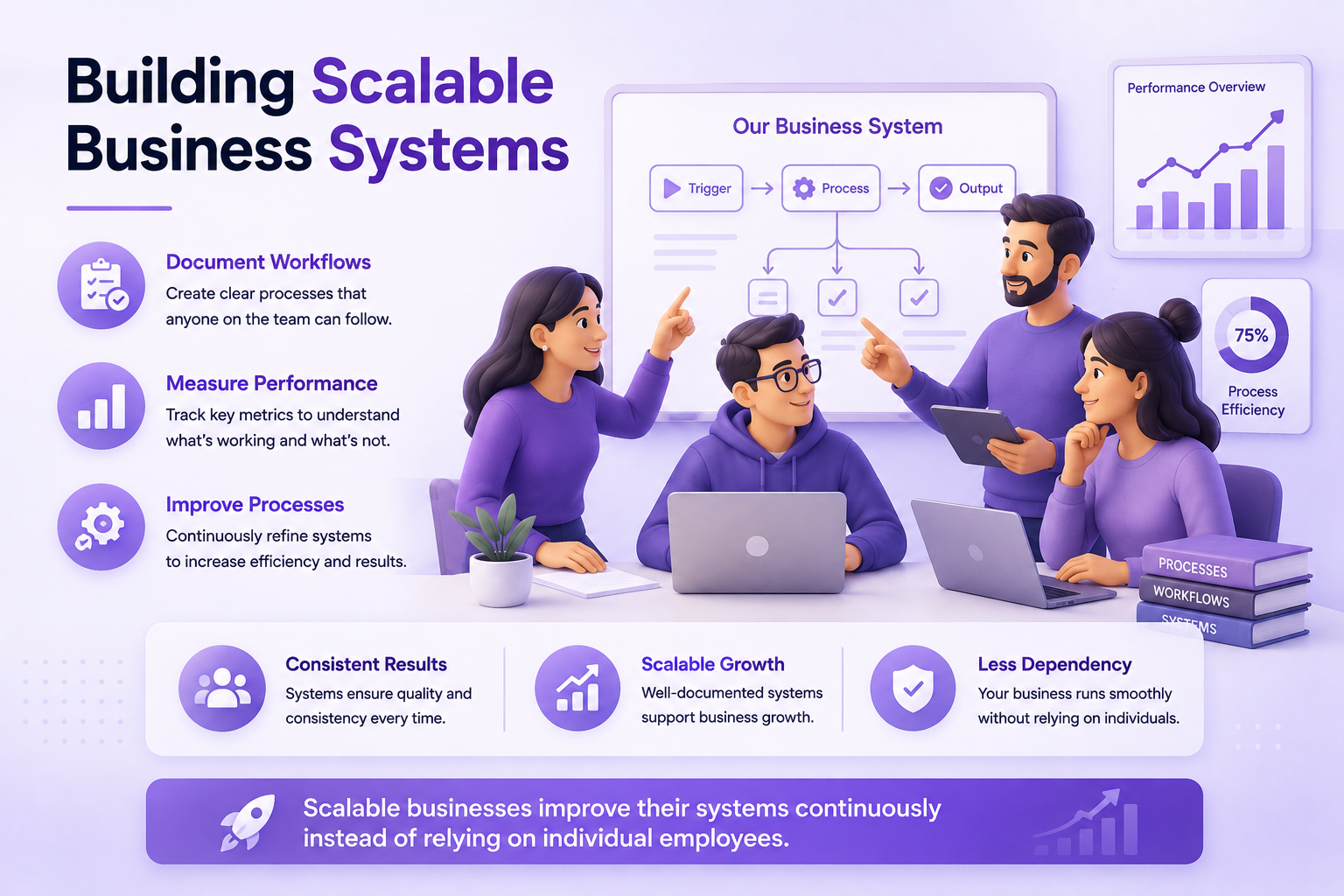
Never expect employees to perform work exactly the way you imagine it. Before handing over responsibilities, create clear documentation explaining every important step. Well-written SOPs reduce training time, improve consistency, and allow new team members to become productive much faster.
Keep Systems Simple
The best systems are easy to understand and easy to follow. Remove unnecessary approvals, duplicate work, and complicated instructions whenever possible. If a new employee can't understand a workflow after reading it once, simplify it further.
Standardize Before You Automate
Automation should improve a proven workflow—not hide an inefficient one. First ensure everyone follows the same process, then automate repetitive steps. Businesses that automate inconsistent workflows usually create larger problems instead of solving them.
Measure What Matters
Every important business system should have measurable outcomes. Track completion time, customer satisfaction, error rates, revenue, and productivity so you can identify opportunities for improvement using real data rather than assumptions.
Review Systems Regularly
Businesses evolve, so your systems should evolve too. Schedule regular reviews to update documentation, remove outdated steps, improve automation, and ensure your processes still reflect how work is actually being completed.
Build Systems Around People, Not Just Software
Technology is valuable, but people are still responsible for delivering great customer experiences and making important business decisions. Use software to support your team, not to replace communication, accountability, or continuous improvement.
Think Long-Term
A scalable business system should still work when your customer base doubles, your team grows, or new services are introduced. Design workflows that are flexible enough to adapt to change without requiring a complete redesign every few months.
Scalable Business Systems Checklist
Before considering any business system complete, use this checklist to make sure it's ready to support long-term growth.
| Checklist | Status |
|---|---|
| Every workflow is documented. | ☐ |
| Each system has a clear owner. | ☐ |
| Standard Operating Procedures (SOPs) are complete. | ☐ |
| Repetitive tasks have been automated where appropriate. | ☐ |
| Performance metrics are reviewed regularly. | ☐ |
| Employees know where documentation is stored. | ☐ |
| Systems are reviewed and improved every quarter. | ☐ |
| The business can continue operating without the owner managing every task. | ☐ |
Final Thoughts
Building a successful business isn't about working longer hours or solving every problem yourself. It's about creating systems that consistently produce great results, regardless of who performs the work. When every important process is documented, repeatable, and continuously improved, your business becomes more efficient, more predictable, and far easier to scale.
You don't need to build every business system in a single week. Start with one process that consumes too much time or creates frequent problems. Document how it works today, simplify unnecessary steps, assign ownership, measure performance, and automate repetitive tasks where appropriate. Once that system is running smoothly, move on to the next. Over time, these small improvements create a business that operates with greater consistency and less dependence on the owner.
Remember that systems are never truly finished. As your business grows, customer expectations change, new technology becomes available, and your team discovers better ways of working. Review your workflows regularly, update your documentation, and treat continuous improvement as part of your company culture. Businesses that adapt their systems consistently are far more likely to grow sustainably than those that rely on habit or memory.
Whether you're a freelancer, small business owner, startup founder, or managing a growing company, investing time in your business systems today will save countless hours in the future. Clear workflows, reliable SOPs, effective automation, and measurable processes give your team the confidence to work independently while maintaining the quality your customers expect.
The companies that scale successfully aren't necessarily the ones with the biggest teams or the largest budgets. They're the ones that build reliable systems, measure what matters, and improve a little every day. Start with one workflow, refine it until it works exceptionally well, and let that become the foundation for building a business that can grow for years to come.