
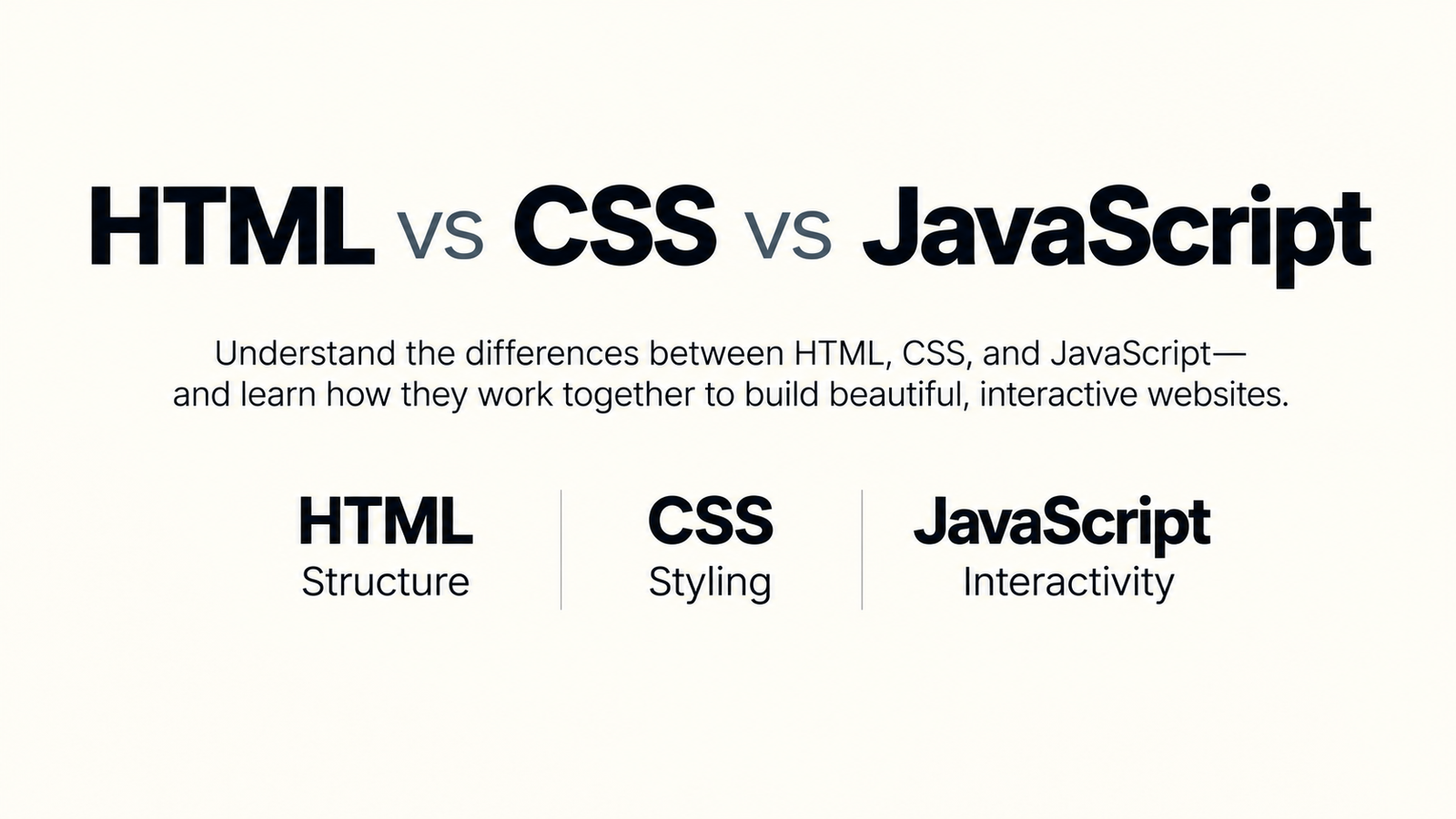
Introduction: Why Understanding HTML, CSS, and JavaScript Matters
If you've ever wondered how websites are built, you've probably come across three technologies mentioned over and over again: HTML, CSS, and JavaScript. These three languages form the foundation of nearly every modern website, from simple personal blogs to large platforms like YouTube, Amazon, Facebook, and Google.
Although they're often grouped together, HTML, CSS, and JavaScript each have a completely different purpose. HTML provides the structure and content of a webpage, CSS controls how everything looks, and JavaScript adds interactivity and dynamic behavior. Understanding how these technologies work individually—and how they work together—is one of the first and most important steps toward becoming a web developer.
Beginners frequently confuse these technologies because they're used in the same project. However, thinking of them as separate parts of a single system makes them much easier to understand. Each language has its own responsibility, strengths, and limitations, and learning when to use each one will help you build cleaner, faster, and more maintainable websites.
In this guide, you'll learn the differences between HTML, CSS, and JavaScript, how each technology works, where it's used, how they interact to create modern websites, common beginner mistakes to avoid, and the best order for learning them if you're just starting your web development journey.

What Is HTML?
HTML, which stands for HyperText Markup Language, is the standard markup language used to create the structure and content of web pages. Every website you visit contains HTML, regardless of its design or functionality. It tells the browser what elements should appear on the page, such as headings, paragraphs, images, buttons, links, videos, forms, and tables.
Unlike programming languages, HTML doesn't perform calculations or make decisions. Instead, it describes the structure of a document using elements called tags. Browsers like Google Chrome, Microsoft Edge, Firefox, and Safari read these tags and display the webpage accordingly.
Think of HTML as the blueprint of a house. Before painting the walls or installing lighting, you first need the foundation, walls, rooms, windows, and doors. Similarly, every webpage begins with HTML because it defines the content and overall layout that other technologies build upon.
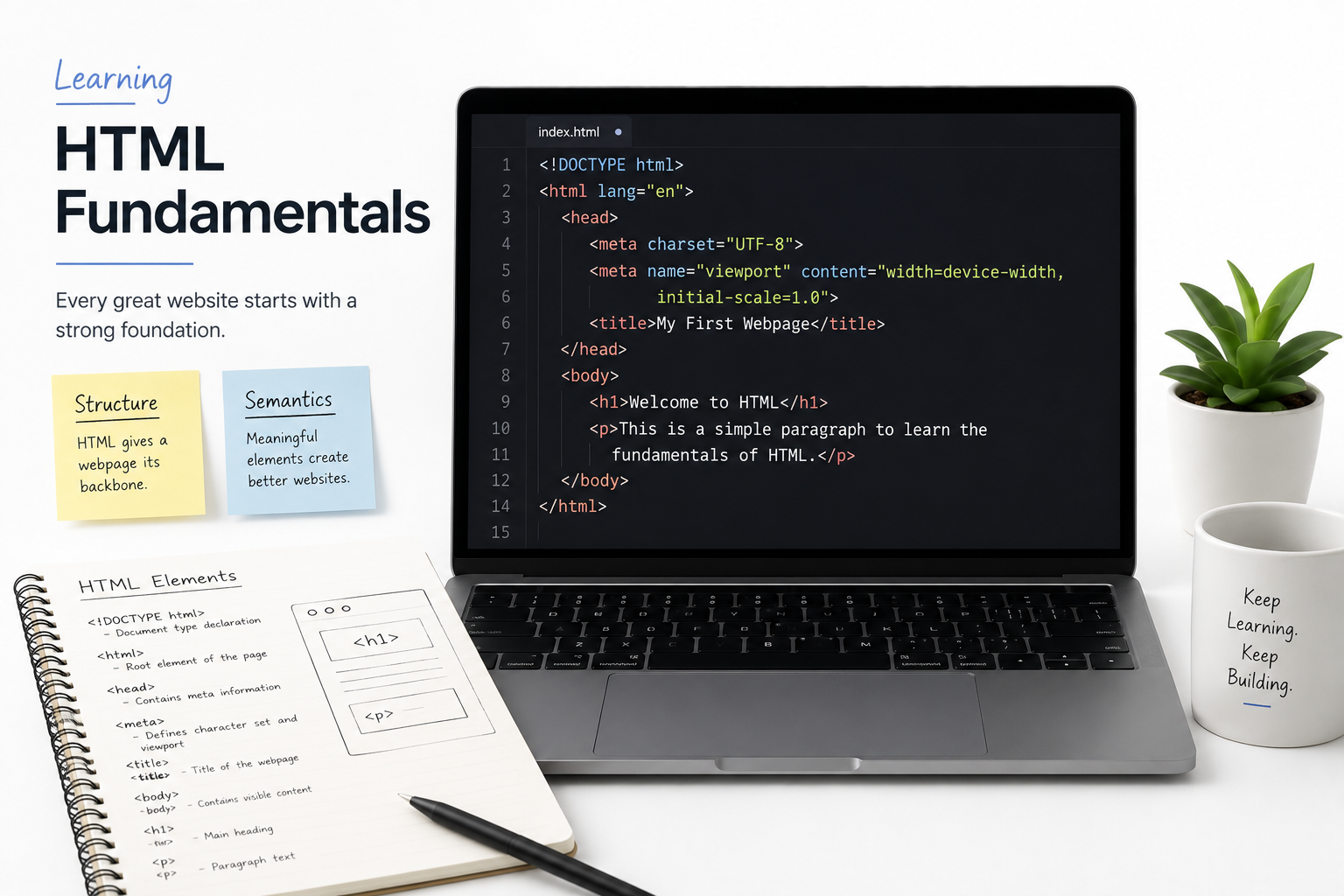
How HTML Works
HTML uses tags enclosed within angle brackets to identify different parts of a webpage. For example, headings are created with heading tags, paragraphs use paragraph tags, images use image tags, and hyperlinks use anchor tags. The browser reads these elements from top to bottom and renders them into the webpage you see on your screen.
<h1>Welcome to My Website</h1>

<p>This is my first web page.</p>

<img src="photo.jpg" alt="Sample image">

<a href="https://example.com">Visit Website</a>
In this example, HTML creates a heading, a paragraph, an image, and a clickable link. While the page contains useful content, it doesn't yet have colors, spacing, animations, or interactive features. Those are added later using CSS and JavaScript.
Common HTML Elements
| HTML Element | Purpose |
|---|---|
| <h1> to <h6> | Creates headings and titles. |
| <p> | Defines a paragraph of text. |
| <img> | Displays an image. |
| <a> | Creates a hyperlink. |
| <ul> / <ol> | Creates unordered and ordered lists. |
| <table> | Displays tabular data. |
| <form> | Collects user input through forms. |
| <button> | Creates clickable buttons. |
Real-World Example
Imagine an online shopping website. HTML creates the product title, price, description, product image, reviews, navigation menu, and "Add to Cart" button. Without HTML, there would be no content for visitors to see. CSS then makes everything visually appealing, while JavaScript powers features like image galleries, shopping carts, and live search.
What Is CSS?
CSS, which stands for Cascading Style Sheets, is the language used to control the appearance and visual design of a webpage. While HTML provides the structure and content, CSS determines how that content looks by controlling colors, fonts, spacing, layouts, borders, animations, and responsive behavior across different devices.
Without CSS, every website would appear as plain black text on a white background with very little visual organization. Modern websites rely on CSS to create attractive user interfaces, maintain consistent branding, and deliver a better user experience on desktops, tablets, and smartphones.
Think of HTML as the frame of a house and CSS as the interior and exterior design. The walls, doors, and windows may already exist, but CSS determines the paint colors, furniture, lighting, flooring, and overall appearance that make the house visually appealing.
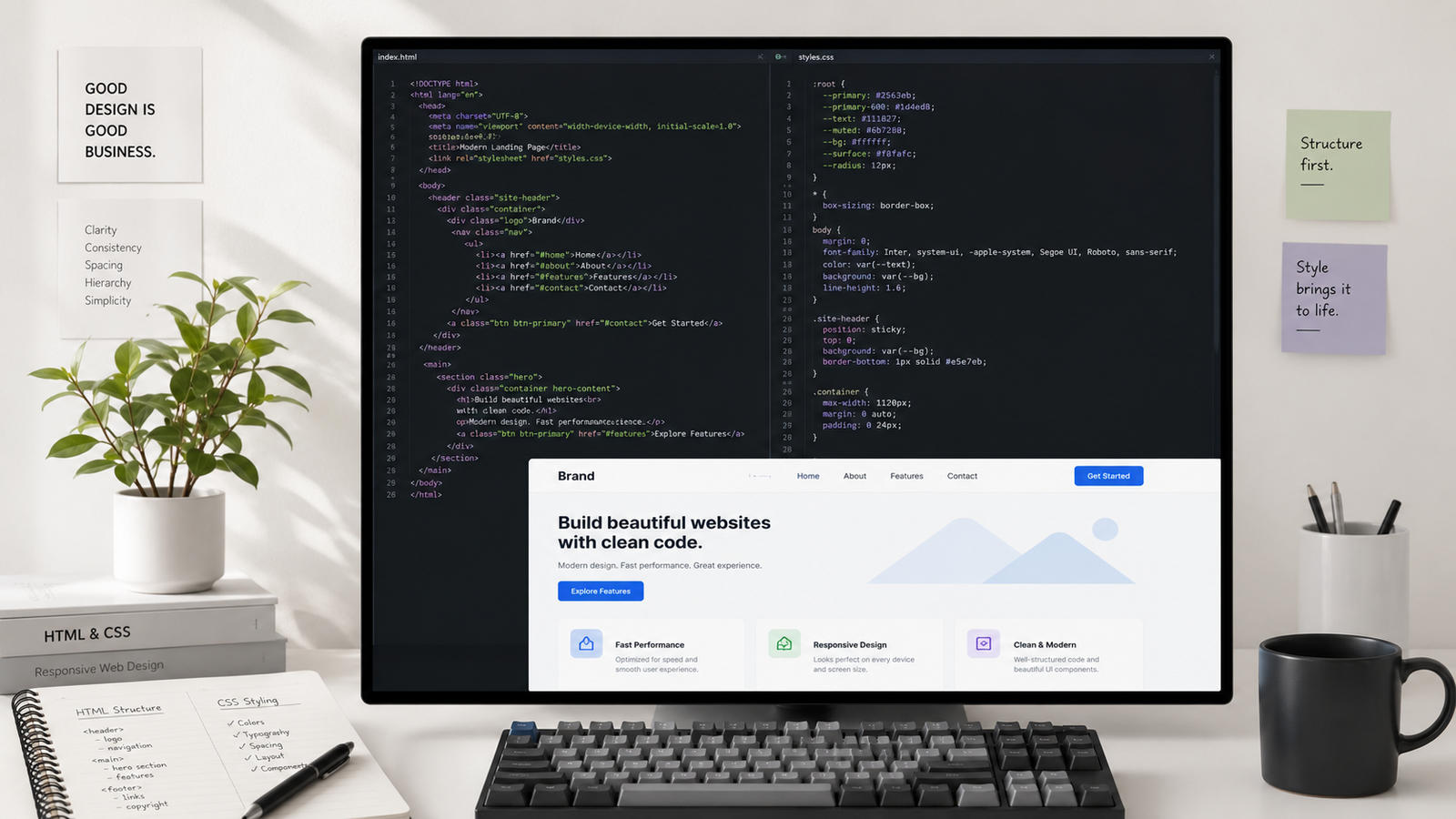
How CSS Works
CSS works by selecting HTML elements and applying styling rules to them. These rules can change text colors, adjust font sizes, add spacing, create layouts, apply shadows, animate elements, and much more. Browsers combine the HTML structure with CSS styles before displaying the final webpage to visitors.
h1 {
    color: #2563eb;
    font-size: 42px;
}

p {
    color: #475569;
    line-height: 1.8;
}

button {
    background: #2563eb;
    color: white;
    padding: 12px 24px;
    border-radius: 8px;
}
In this example, CSS changes the heading color, improves paragraph readability, and styles a button. The HTML content remains exactly the same—the browser simply displays it differently because of the CSS rules.
Types of CSS
| Type | Description | Best Used For |
|---|---|---|
| Inline CSS | Styles written directly inside an HTML element. | Small, one-time style changes. |
| Internal CSS | Styles placed inside a <style> tag within the HTML document. | Single-page websites or testing. |
| External CSS | Styles stored in a separate .css file. | Professional websites and large projects. |
Real-World Example
Imagine an e-commerce website selling shoes. HTML creates the product name, images, price, and "Buy Now" button. CSS determines the page layout, colors, typography, button styles, spacing, hover effects, and responsive design so the website looks professional and works well on every screen size. Without CSS, the shopping experience would feel plain and difficult to navigate.
What Is JavaScript?
JavaScript is a high-level programming language that adds interactivity and dynamic functionality to websites. While HTML creates the structure and CSS controls the appearance, JavaScript makes webpages responsive to user actions such as clicking buttons, submitting forms, opening menus, playing videos, displaying notifications, and updating content without reloading the page.
Today, JavaScript powers millions of websites and web applications. From simple image sliders to complex platforms like YouTube, Netflix, Google Maps, and online banking systems, JavaScript enables the interactive experiences users expect from modern websites.
If HTML is the structure of a house and CSS is its interior design, JavaScript is everything that makes the house functional. It controls lights, automatic doors, security systems, elevators, and smart devices, allowing people to interact with the environment rather than simply looking at it.
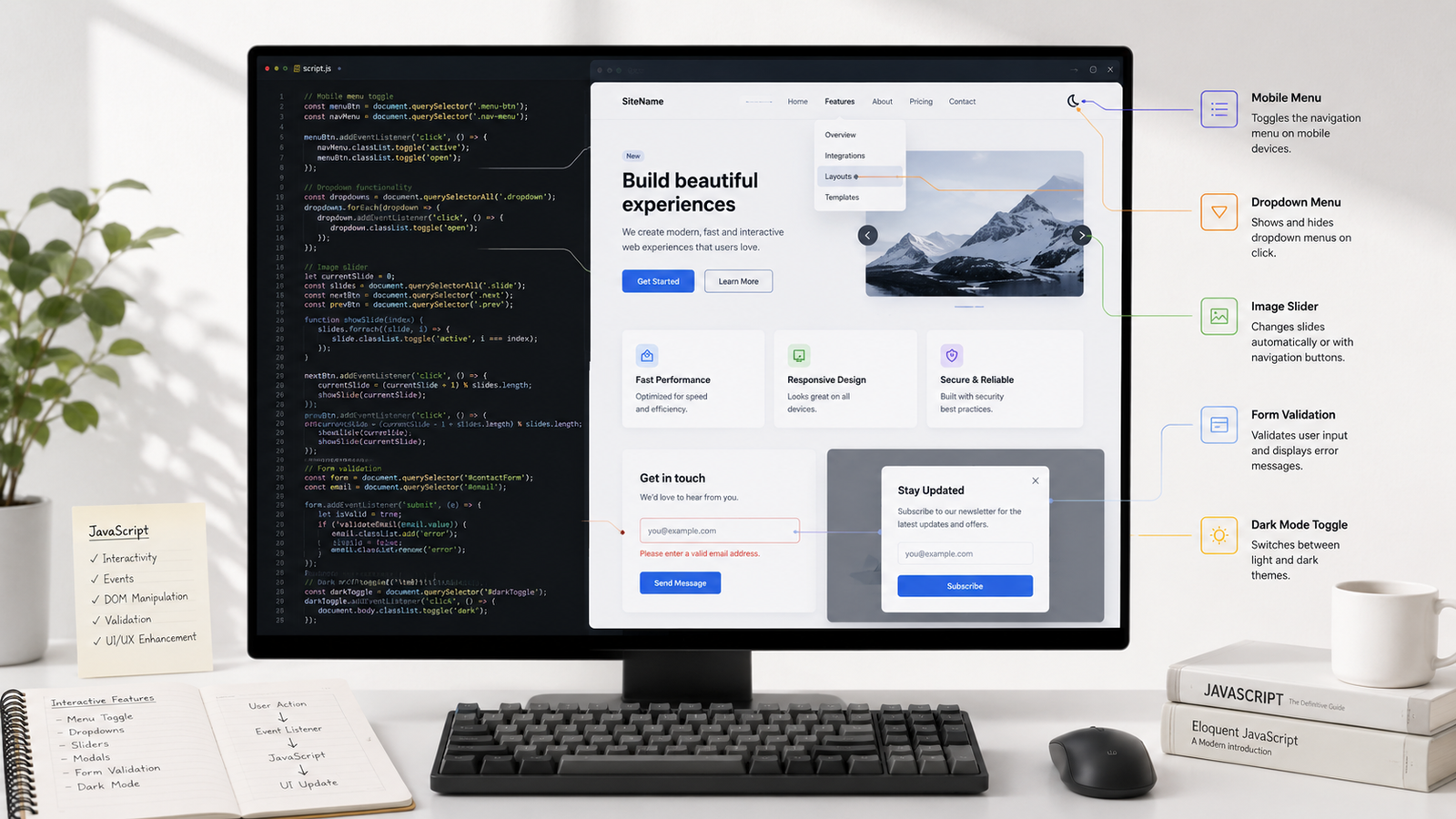
How JavaScript Works
JavaScript runs directly inside the user's web browser after the HTML and CSS have loaded. It can read and modify HTML elements, change CSS styles, respond to user interactions, retrieve data from servers, validate forms, and update webpage content instantly without requiring the entire page to refresh.
const button = document.querySelector("button");

button.addEventListener("click", () => {
    alert("Welcome to my website!");
});
In this example, JavaScript waits for a visitor to click a button. When the button is clicked, the browser immediately displays a welcome message. This type of interaction would not be possible using HTML and CSS alone.
Common JavaScript Features
| Feature | Purpose |
|---|---|
| Event Handling | Responds to user actions such as clicks, typing, and scrolling. |
| DOM Manipulation | Updates HTML elements dynamically without reloading the page. |
| Form Validation | Checks user input before sending data to the server. |
| Animations | Creates interactive transitions and visual effects. |
| API Requests | Retrieves data from external services without refreshing the page. |
| Timers | Runs code after a delay or at repeated intervals. |
Real-World Example
Imagine shopping on an online store. When you click the Add to Cart button, JavaScript instantly updates the shopping cart, recalculates the total price, displays the number of items, and may even recommend related products—all without reloading the page. These dynamic interactions create the fast, seamless experience users expect from modern websites and web applications.
HTML vs CSS vs JavaScript: The Key Differences
HTML, CSS, and JavaScript are the three core technologies used to build modern websites, but each serves a completely different purpose. HTML creates the structure of a webpage, CSS controls its visual appearance, and JavaScript adds interactivity and dynamic functionality. While they often work together in the same project, understanding their individual responsibilities makes it much easier to learn web development.
A simple way to remember the difference is to think of building a house. HTML creates the walls, rooms, windows, and doors. CSS paints the walls, installs flooring, chooses furniture, and decorates the interior. JavaScript adds electricity, automatic doors, security systems, lighting controls, and other features that allow people to interact with the house.
| Feature | HTML | CSS | JavaScript |
|---|---|---|---|
| Primary Purpose | Defines page structure and content. | Controls appearance and layout. | Adds interactivity and dynamic behavior. |
| Type | Markup language. | Style sheet language. | Programming language. |
| Controls | Headings, paragraphs, images, forms, links. | Colors, fonts, spacing, layouts, animations. | Events, logic, calculations, APIs, dynamic updates. |
| File Extension | .html | .css | .js |
| Can Work Alone? | Yes, but only as a basic webpage. | Requires HTML to style content. | Usually works with HTML to interact with webpages. |
| Learning Difficulty | Beginner | Beginner to Intermediate | Intermediate |
| Example Task | Create a contact form. | Style the contact form. | Validate the form before submission. |
Which Technology Should You Learn First?
If you're new to web development, start with HTML because it teaches you how webpages are structured. Once you're comfortable creating headings, paragraphs, images, links, and forms, move on to CSS to learn how to style those elements and create responsive layouts. After understanding both HTML and CSS, begin learning JavaScript to make your websites interactive and dynamic.
Although these technologies can be learned separately, they are most powerful when used together. Every professional front-end developer relies on HTML for structure, CSS for presentation, and JavaScript for functionality to create modern, responsive, and engaging websites.
How HTML, CSS, and JavaScript Work Together
Although HTML, CSS, and JavaScript have different responsibilities, they are designed to work together as a complete web development stack. HTML creates the content and structure of a webpage, CSS improves its visual appearance, and JavaScript adds functionality that allows users to interact with the page. Removing any one of these technologies changes how a website looks or behaves.
Most modern websites follow this same workflow. Developers first create the page using HTML, then style it with CSS, and finally use JavaScript to add interactive features. Separating these responsibilities makes websites easier to build, maintain, and update over time.
Step 1: HTML Creates the Structure
Every webpage begins with HTML. It defines headings, paragraphs, navigation menus, images, buttons, forms, tables, and other content that users see in the browser. Without HTML, there would be no webpage to display.
<h1>Coffee Shop</h1>

<p>Fresh coffee served every day.</p>

<button>Order Now</button>
Step 2: CSS Styles the Page
Once the HTML structure exists, CSS controls how everything looks. It changes colors, fonts, spacing, layouts, button styles, shadows, animations, and responsive behavior so the webpage appears polished and professional.
button {
    background: #2563eb;
    color: white;
    padding: 12px 24px;
    border-radius: 8px;
}
Step 3: JavaScript Adds Interactivity
Finally, JavaScript brings the webpage to life. It responds to user actions, validates forms, opens menus, updates shopping carts, loads additional content, and communicates with servers without requiring a full page refresh.
document
    .querySelector("button")
    .addEventListener("click", () => {
        alert("Thank you for your order!");
    });
A Real-World Example
Imagine you're visiting an online restaurant website. HTML creates the menu, food images, prices, and the "Order Now" button. CSS styles the page with attractive colors, spacing, typography, and responsive layouts that look great on mobile devices. JavaScript handles actions such as opening the shopping cart, updating the order total, applying discount codes, and submitting the order without reloading the page.
| Technology | Responsibility | Restaurant Website Example |
|---|---|---|
| HTML | Creates the webpage structure. | Menu items, prices, images, and buttons. |
| CSS | Styles the webpage. | Colors, fonts, layouts, spacing, and responsive design. |
| JavaScript | Adds dynamic functionality. | Shopping cart updates, order validation, and interactive menus. |
Together, these three technologies create the fast, responsive, and interactive websites people use every day. Learning how they complement one another is the foundation of modern front-end web development.
A Simple Example Using HTML, CSS, and JavaScript Together
Understanding the individual roles of HTML, CSS, and JavaScript is important, but seeing them work together makes the differences much clearer. The following example creates a simple webpage containing a heading, a paragraph, and a button. HTML builds the structure, CSS improves the appearance, and JavaScript adds an interactive action when the button is clicked.
Although this is a simple project, the same workflow is used to build complex websites, online stores, dashboards, and web applications.
Step 1: Create the HTML Structure
<h1>Welcome</h1>

<p>Click the button below.</p>

<button id="btn">
    Click Me
</button>
This HTML creates a heading, a short paragraph, and a button. At this point the page contains content but has very little visual styling or functionality.
Step 2: Style the Page with CSS
body{
    font-family:Arial,sans-serif;
    text-align:center;
    margin-top:60px;
}

button{
    background:#2563eb;
    color:#fff;
    border:none;
    padding:12px 24px;
    border-radius:8px;
    cursor:pointer;
}

button:hover{
    background:#1d4ed8;
}
CSS transforms the plain HTML into a cleaner interface by changing fonts, colors, spacing, alignment, and button styling. No HTML elements are added or removed—the presentation simply becomes more attractive.
Step 3: Add Interactivity with JavaScript
document
.getElementById("btn")
.addEventListener("click",function(){

    alert("Welcome to our website!");

});
JavaScript listens for the button click. When a visitor presses the button, the browser immediately displays a welcome message. This interaction happens instantly without reloading the page, demonstrating one of JavaScript's core strengths.
Final Result
Together, these three technologies create a complete webpage:
| Technology | Contribution |
|---|---|
| HTML | Creates the heading, paragraph, and button. |
| CSS | Styles the page with colors, spacing, fonts, and button appearance. |
| JavaScript | Detects the button click and displays an interactive message. |
This simple example demonstrates the relationship between the three technologies. HTML provides the foundation, CSS enhances the presentation, and JavaScript delivers functionality. Nearly every modern website—from personal portfolios to large e-commerce platforms—uses this same combination, with each technology handling its own responsibility.
When Should You Use HTML, CSS, and JavaScript?
One of the biggest questions beginners ask is when each technology should be used. Since HTML, CSS, and JavaScript work together, it's easy to assume they can replace one another. In reality, each one has a specific responsibility, and using the right technology for the right task makes websites easier to build, maintain, and expand.
The following examples demonstrate when HTML, CSS, and JavaScript should be used and when another technology is a better choice.
When Should You Use HTML?
Use HTML whenever you need to create the structure or content of a webpage. It is responsible for defining headings, paragraphs, navigation menus, images, videos, forms, tables, buttons, and links. Every webpage starts with HTML because browsers need a document structure before anything can be styled or made interactive.
- Create headings and page titles.
- Build navigation menus.
- Add images, videos, and audio.
- Create forms for user input.
- Organize articles, sections, and layouts.
HTML should not be used to control colors, spacing, animations, or interactive behavior because those responsibilities belong to CSS and JavaScript.
When Should You Use CSS?
CSS should be used whenever you want to change the appearance of a webpage. It controls typography, colors, spacing, layouts, borders, animations, shadows, responsive design, and visual effects. A well-written CSS stylesheet allows an entire website to maintain a consistent look and feel.
- Style buttons and navigation menus.
- Create responsive layouts.
- Apply fonts and color palettes.
- Add animations and transitions.
- Improve the visual appearance of web pages.
CSS cannot perform calculations, validate forms, or respond to user interactions. For those tasks, JavaScript is required.
When Should You Use JavaScript?
JavaScript should be used whenever a webpage needs to react to user actions or perform dynamic tasks. It enables interactive features such as dropdown menus, sliders, search functionality, shopping carts, form validation, real-time updates, and communication with servers.
- Validate forms before submission.
- Create interactive navigation menus.
- Update content without refreshing the page.
- Display notifications and modal windows.
- Connect to APIs and load live data.
- Build interactive web applications.
JavaScript works best alongside HTML and CSS. While it can modify webpage content and styles, it relies on HTML to provide the elements it interacts with and CSS to control their appearance.
| Task | Best Technology |
|---|---|
| Create webpage content | HTML |
| Change colors and fonts | CSS |
| Build responsive layouts | CSS |
| Validate forms | JavaScript |
| Create image sliders | JavaScript |
| Display text and images | HTML |
Advantages and Limitations of HTML, CSS, and JavaScript
HTML, CSS, and JavaScript have remained the foundation of web development for decades because each technology solves a specific problem exceptionally well. At the same time, none of them is designed to do everything. Understanding their strengths and limitations helps developers choose the right tool for each task and build websites that are easier to maintain, faster to load, and more enjoyable to use.
Rather than competing with one another, these technologies complement each other. HTML provides structure, CSS handles presentation, and JavaScript delivers behavior. Together they form the complete front-end of virtually every modern website.
Advantages of HTML
- Easy to learn and beginner-friendly.
- Creates the structure for every webpage.
- Supported by every modern web browser.
- Provides semantic elements that improve accessibility and SEO.
- Works seamlessly with CSS and JavaScript.
Limitations of HTML
- Cannot create visual designs by itself.
- Does not support animations or interactivity.
- Cannot perform calculations or process user input.
- Requires CSS for styling and JavaScript for dynamic functionality.
Advantages of CSS
- Creates attractive and responsive user interfaces.
- Separates design from content for easier maintenance.
- Supports animations, transitions, gradients, shadows, and layouts.
- Makes websites consistent across multiple pages.
- Improves the overall user experience.
Limitations of CSS
- Cannot add logic or perform calculations.
- Depends on HTML elements to apply styles.
- Large stylesheets can become difficult to manage without good organization.
- Different browsers may occasionally render advanced features differently.
Advantages of JavaScript
- Adds interactivity to websites.
- Updates webpage content without reloading the page.
- Communicates with APIs and external services.
- Supports modern web applications and single-page applications.
- Runs directly in the browser without additional software.
Limitations of JavaScript
- Has a steeper learning curve than HTML and CSS.
- Poorly written code can reduce website performance.
- Different browsers may handle certain features differently.
- Requires careful testing to ensure reliability and security.
| Technology | Biggest Strength | Biggest Limitation |
|---|---|---|
| HTML | Creates webpage structure. | Cannot style or add interactivity. |
| CSS | Creates beautiful, responsive designs. | Cannot perform programming logic. |
| JavaScript | Adds dynamic functionality and interactivity. | More complex to learn and debug. |
Common Beginner Mistakes When Learning HTML, CSS, and JavaScript
Every web developer makes mistakes while learning HTML, CSS, and JavaScript. Most beginners don't struggle because these technologies are difficult—they struggle because they learn them in the wrong order, skip important fundamentals, or rely too heavily on copying code without understanding how it works. Recognizing these common mistakes early can save countless hours of frustration and help you become a more confident developer.
The good news is that these mistakes are easy to avoid once you understand why they happen. Building a strong foundation will make learning advanced frameworks and libraries much easier later.
Learning JavaScript Before Understanding HTML and CSS
Many beginners jump straight into JavaScript because they want to create interactive websites immediately. However, JavaScript works with HTML elements and CSS styles, so it's much easier to understand once you're comfortable building and styling web pages first.
Using Inline CSS Everywhere
Writing styles directly inside HTML elements may seem convenient for small experiments, but it quickly becomes difficult to maintain. Professional developers use external CSS files so styles can be reused across multiple pages and updated from a single location.
Ignoring Semantic HTML
Using semantic elements such as <header>, <main>, <section>, <article>, and <footer> improves accessibility, SEO, and code readability. Relying only on generic <div> elements makes websites harder to understand and maintain.
Copying Code Without Understanding It
Tutorials and code examples are valuable learning resources, but copying them without understanding how they work limits your progress. Take time to experiment, modify the code, and understand why each line exists.
Skipping Responsive Design
Modern websites must work on desktops, tablets, and smartphones. Beginners often design only for large screens and discover later that their layouts break on mobile devices. Learning responsive design early will save significant time as your projects become more complex.
Not Using Browser Developer Tools
Browser developer tools make it easy to inspect HTML, test CSS changes, debug JavaScript, and identify layout issues. Learning how to use these built-in tools is one of the fastest ways to improve your troubleshooting skills.
Building Tutorials Instead of Projects
Watching tutorials is helpful, but real learning happens when you build your own projects. Creating landing pages, portfolios, calculators, blogs, and small web applications forces you to solve problems independently and strengthens your understanding of HTML, CSS, and JavaScript.
| Common Mistake | Better Approach |
|---|---|
| Learning JavaScript first. | Learn HTML → CSS → JavaScript. |
| Using inline CSS everywhere. | Create reusable external CSS files. |
| Copying code blindly. | Understand every example before using it. |
| Ignoring responsive design. | Test websites on different screen sizes. |
| Only watching tutorials. | Build real-world projects regularly. |
Best Practices for Learning HTML, CSS, and JavaScript
Learning web development is much easier when you follow a structured approach instead of jumping randomly between technologies. HTML, CSS, and JavaScript each build upon the previous one, so developing good habits early will help you write cleaner code, solve problems more efficiently, and become a more confident developer. These best practices are followed by both beginners and experienced professionals.
Rather than trying to memorize every tag, property, or function, focus on understanding the purpose of each technology and practice applying it through real projects.
Learn the Fundamentals First
Before exploring frameworks like React, Angular, or Vue, make sure you understand how HTML, CSS, and JavaScript work on their own. A strong foundation makes advanced tools much easier to learn because you'll understand what's happening behind the scenes.
Write Semantic HTML
Use meaningful HTML elements such as <header>, <main>, <section>, <article>, and <footer> whenever possible. Semantic HTML improves accessibility, search engine optimization, and makes your code easier to understand.
Keep Structure, Design, and Functionality Separate
Store HTML, CSS, and JavaScript in separate files whenever practical. This keeps projects organized, simplifies maintenance, and allows different parts of your website to be updated without affecting unrelated code.
Build Real Projects Regularly
Reading tutorials is helpful, but building projects is where real learning happens. Try creating landing pages, portfolios, calculators, blogs, weather apps, to-do lists, or small business websites. Every project introduces new challenges that strengthen your problem-solving skills.
Learn How to Debug Your Code
Bugs are a normal part of programming. Learn to use your browser's Developer Tools to inspect HTML, test CSS changes, monitor network requests, and identify JavaScript errors. Debugging is one of the most valuable skills every developer should develop.
Learn Version Control with Git
Git allows you to track changes, restore previous versions, and collaborate with other developers. Even if you're working alone, using version control helps protect your projects and provides a professional workflow.
Read Official Documentation
Tutorials are excellent for getting started, but official documentation provides the most accurate and up-to-date information. Becoming comfortable reading documentation will help you solve problems independently throughout your career.
Practice Consistently
Learning web development is a gradual process. Practicing for a short period every day is usually more effective than studying for many hours only once in a while. Small, consistent improvements accumulate quickly over time.
| Best Practice | Benefit |
|---|---|
| Learn HTML → CSS → JavaScript | Builds a strong foundation. |
| Write semantic HTML | Improves accessibility and SEO. |
| Separate your files | Keeps projects clean and maintainable. |
| Build real projects | Reinforces practical knowledge. |
| Use Developer Tools | Makes debugging much easier. |
| Learn Git | Tracks changes and supports collaboration. |
| Practice consistently | Builds long-term confidence and experience. |
Learning Roadmap: What Should You Learn After HTML, CSS, and JavaScript?
Learning HTML, CSS, and JavaScript is only the beginning of your web development journey. Once you understand these three core technologies, you'll have the foundation needed to explore modern frameworks, backend development, databases, deployment, and full-stack application development. Rather than trying to learn everything at once, follow a structured roadmap that gradually builds your skills through practical experience.
The roadmap below is suitable for beginners who want to become front-end developers, full-stack developers, or freelance web developers. Each stage builds on the previous one, making the learning process more manageable and effective.
Step 1: Master HTML Fundamentals
Start by understanding semantic HTML, headings, paragraphs, forms, images, tables, lists, navigation menus, accessibility, and proper document structure. Every website begins with well-organized HTML.
Step 2: Learn Modern CSS
Focus on layouts, Flexbox, CSS Grid, responsive design, typography, spacing, animations, transitions, media queries, and reusable styling techniques. Modern CSS allows you to build responsive websites that work across all screen sizes.
Step 3: Become Comfortable with JavaScript
Learn variables, functions, arrays, objects, loops, conditionals, events, DOM manipulation, asynchronous programming, fetch requests, and ES6 features such as arrow functions and modules. JavaScript transforms static webpages into interactive applications.
Step 4: Build Real Projects
Apply your knowledge by creating landing pages, portfolios, blogs, calculators, weather apps, to-do lists, image galleries, dashboards, and small business websites. Real projects help reinforce concepts and build a portfolio you can share with employers or clients.
Step 5: Learn Git and GitHub
Version control is an essential skill for every developer. Git helps you track changes, collaborate with others, and safely manage your projects, while GitHub allows you to store code online and showcase your work.
Step 6: Explore Front-End Frameworks
Once you're confident with JavaScript, learning a framework such as React, Vue, or Angular becomes much easier. These tools simplify building large, interactive applications and are widely used in professional development.
Step 7: Learn Backend Development
To become a full-stack developer, learn how servers, databases, APIs, authentication, and backend programming work. Popular backend technologies include Node.js, PHP, Python, ASP.NET, and Java.
Step 8: Deploy Your Projects
Publishing your projects online is the final step. Learn how to purchase a domain name, choose web hosting, deploy applications, connect a database, configure SSL certificates, and optimize your website for performance and search engines.
| Learning Stage | Primary Goal |
|---|---|
| HTML | Build webpage structure and semantic content. |
| CSS | Create responsive layouts and attractive designs. |
| JavaScript | Add interactivity and dynamic functionality. |
| Git & GitHub | Manage projects and collaborate effectively. |
| Frameworks | Build scalable modern web applications. |
| Backend Development | Create complete full-stack applications. |
| Deployment | Publish websites and applications online. |
Putting It All Together
HTML, CSS, and JavaScript aren't competing technologies—they're complementary building blocks that work together to create every modern website. HTML provides the structure, CSS transforms that structure into an attractive and responsive design, and JavaScript adds the interactivity that makes websites engaging and useful. Understanding how these three technologies fit together is the first major milestone in becoming a web developer.
If you're just beginning your web development journey, resist the temptation to rush into advanced frameworks or libraries. Spend time mastering HTML first, then learn how CSS controls layouts and visual design, and finally explore JavaScript to make your pages interactive. Building a strong foundation now will make every future technology—from React and Next.js to backend development and full-stack applications—much easier to learn.
Remember that becoming a skilled developer isn't about memorizing every HTML tag, CSS property, or JavaScript method. It's about understanding when to use each technology, knowing how they interact, and developing the confidence to solve problems by building real projects. Every landing page, portfolio, dashboard, online store, and web application starts with these same three core technologies.
The best way to improve is through consistent practice. Start with small projects such as personal portfolios, pricing pages, calculators, blogs, or to-do applications. As your skills grow, challenge yourself with responsive websites, API integrations, authentication systems, and complete web applications. Each project will strengthen your understanding and prepare you for more advanced concepts.
Web development is constantly evolving, but HTML, CSS, and JavaScript remain at its core. New frameworks, libraries, and tools are built on top of these technologies—not as replacements for them. Developers who understand the fundamentals are better equipped to learn new tools, adapt to industry changes, and write cleaner, more maintainable code throughout their careers.
Whether your goal is to become a front-end developer, full-stack engineer, freelancer, or simply build your own website, investing time in HTML, CSS, and JavaScript is one of the smartest decisions you can make. Master these fundamentals, keep building real projects, stay curious, and you'll have the skills needed to create modern, responsive, and interactive websites with confidence.